Deploy a React App with the AWS CDK
Learn how to deploy a React app using AWS CDK with S3 and CloudFront.
Deploy a React App with the AWS CDK
This is a follow-up to my earlier post about Getting Started with AWS CDK. In that piece, I talked about how I began using AWS CDK in my work environment.
We still have some Lambda functions set up with AWS CDK, and we're exploring other features like Step Functions, SQS, and a few additional resources. However, our application infrastructure and frontend haven't been integrated with CDK yet.
I want to create an example repository with CDK without repeating what I've done for AWS Lambda functions and Step Functions, so I'm considering implementing CloudFront with AWS CDK.
Setting up the CDK app
If you decide to clone my sample repository on GitHub, you'll find that I've already set up both the React project and the CDK App.
In this example, I'm using TypeScript for both the CDK and React, along with Vite.
I started by creating a repository named aws-cdk-react-start and ran the command:
cdk init app --language typescriptSetting up the React app with Vite
To set up React code in the same repository:
npm create vite@latest- Vite will let you pick any framework you want, so use the arrow keys to select React.
- Next, Vite will ask you to choose the programming language for your project.
There's a bit of a challenge when trying to manage both CDK and React in the same folder. CDK runs on CommonJS modules, while Vite for React uses ESNext, which can lead to conflicts.
Building the CDK App
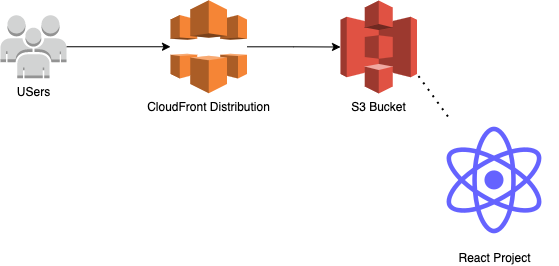
We're looking to create an app that will host a React project as a static site on S3, using CloudFront for distribution.
Our goal for this project is straightforward:
- Store the static build files from React in S3
- Set up our CloudFront distribution
- Deploy everything to S3 along with the distribution
Creating the S3 Bucket
const bucket = new Bucket(this, "MyWebBucket", {
  bucketName: "aws-cdk-react-start-web",
  websiteIndexDocument: "index.html",
  publicReadAccess: true,
  blockPublicAccess: BlockPublicAccess.BLOCK_ACLS,
  removalPolicy: RemovalPolicy.DESTROY,
});
Setting up CloudFront Distribution
const distribution = new Distribution(this, 'MyDistribution', {
  defaultBehavior: {
    origin: S3BucketOrigin.withBucketDefaults(bucket),
    viewerProtocolPolicy: ViewerProtocolPolicy.REDIRECT_TO_HTTPS,
  },
  defaultRootObject: 'index.html',
  errorResponses: [
    {
      httpStatus: 404,
      responseHttpStatus: 200,
      responsePagePath: '/index.html',
    },
  ],
});
Deploy to S3
new BucketDeployment(this, "DeploySite", {
  sources: [Source.asset("./dist")],
  destinationBucket: bucket,
  distribution,
  distributionPaths: ["/*"],
});
Output the URLs
new CfnOutput(this, "CloudFrontURL", {
  value: distribution.domainName,
  description: "The distribution URL",
  exportName: "CloudfrontURL",
});

new CfnOutput(this, "BucketName", {
  value: bucket.bucketName,
  description: "The name of the S3 bucket",
  exportName: "BucketName",
});
Deploying the Full Project
You'll often use commands like cdk synth, cdk deploy and cdk destroy with CDK apps.
I prefer to automate this process with a script:
npm run build && cdk deploy --context stage=devWhen the deployment is finished, you'll get the CloudFront URL. Copy that link, paste it into your browser, and you'll be able to see your React App!
Wrapping Up
In this post, I covered the process of deploying a React app using the AWS CDK. I'm also interested in creating a step function with the AWS CDK, and I'll be diving into that soon with a more practical use case.